Why people are switching from Evernote
Evernote pioneered digital note-taking, but many long-time users have been looking for a way out in recent years:
- The free plan is now capped at 50 notes and one notebook, which makes it unusable as a real archive.
- Subscription prices have risen repeatedly, while the feature set has stayed largely the same.
- Your notes live in a proprietary cloud. Getting ten years of notes out of Evernote is possible, but only through export files, and everything depends on their servers.
Obsidian takes the opposite approach: it is free for personal use, works fully offline, and stores every note as a plain Markdown file in a folder on your device. No lock-in, no note limits, and an ecosystem of thousands of community plugins. The one thing people miss when they switch is Evernote's polished interface, and that is exactly what Notebook Navigator brings back.
Evernote vs Obsidian with Notebook Navigator
| Evernote | Obsidian + Notebook Navigator | |
|---|---|---|
| Price | Free plan limited to 50 notes; paid plans required for real use | Free for personal use; Notebook Navigator is free and open source |
| Where your notes live | Proprietary format on Evernote's servers | Plain Markdown files in a folder you control |
| Notebooks & stacks | Notebooks and stacks | Folders and subfolders in a dual-pane layout |
| Note list | Snippets and thumbnails | Visual previews with automatic image thumbnails |
| Tags | Tag sidebar | Hierarchical tag browser, with colors and icons |
| Web clipping | Evernote Web Clipper | Official Obsidian Web Clipper extension, saves pages as Markdown |
| Offline access | Limited on free and lower tiers | Offline-first; everything works without a connection |
| Mobile | iOS and Android apps | iOS and Android apps, with full Notebook Navigator support |
| Extensibility | Fixed feature set | Thousands of community plugins |
How to migrate from Evernote to Obsidian
The whole migration takes four steps and uses the official, free Obsidian Importer plugin. Your Evernote notes, attachments and tags all come along.
1. Export your notes from Evernote
In the Evernote desktop app, right-click a notebook and choose Export Notebook,
then save it as an .enex file. Repeat for each notebook you want to keep.
2. Install Obsidian and create a vault
Download Obsidian for free from obsidian.md and create a new vault, a folder on your device where your Markdown files will live.
3. Import your .enex files
In Obsidian, go to Settings → Community plugins, install Importer, and run the command Importer: Open importer. Choose Evernote (.enex), select your exported files, and import. Every note becomes a Markdown file, attachments are copied into your vault, and your tags are preserved.
4. Install Notebook Navigator
Finally, install Notebook Navigator from Community plugins (or with one click from this install link). It replaces Obsidian's default file tree with an Evernote-style interface.
Get the Evernote experience back, feature by feature
Notebook Navigator is the most popular file explorer plugin for Obsidian, and it maps naturally onto the Evernote workflow you already know:
- Notebooks → folder pane. Browse folders in the left pane, exactly like Evernote's notebook list.
- Note list with snippets → visual previews. The right pane shows each note with a text preview and an automatic image thumbnail.
- Tag sidebar → hierarchical tag browser. Browse nested tags, and give them rainbow colors and custom icons.
- Shortcuts → shortcuts, pinned notes and recent files, always one click away.
- Search → powerful search across names, tags and properties, plus full-text search through Obsidian.
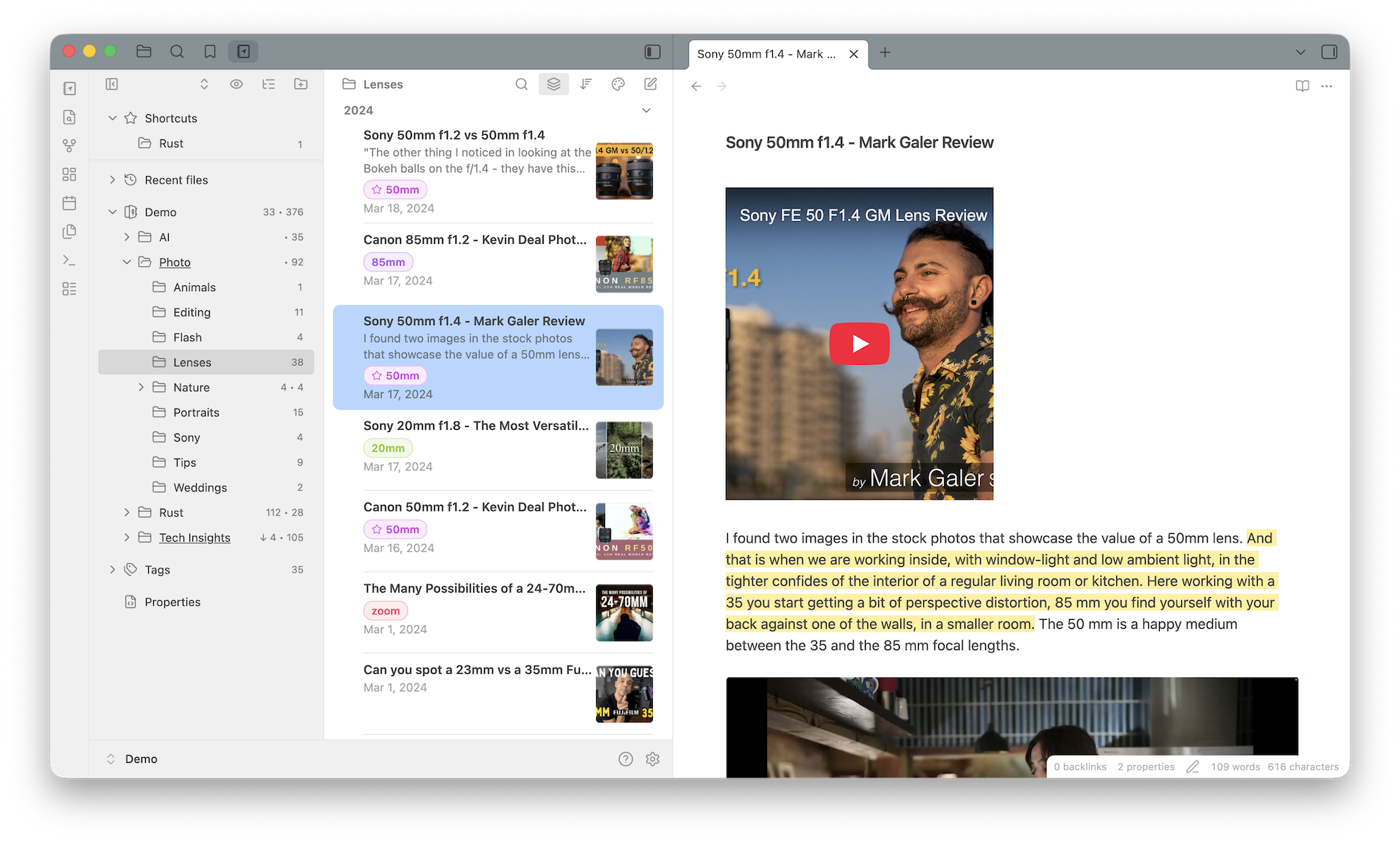
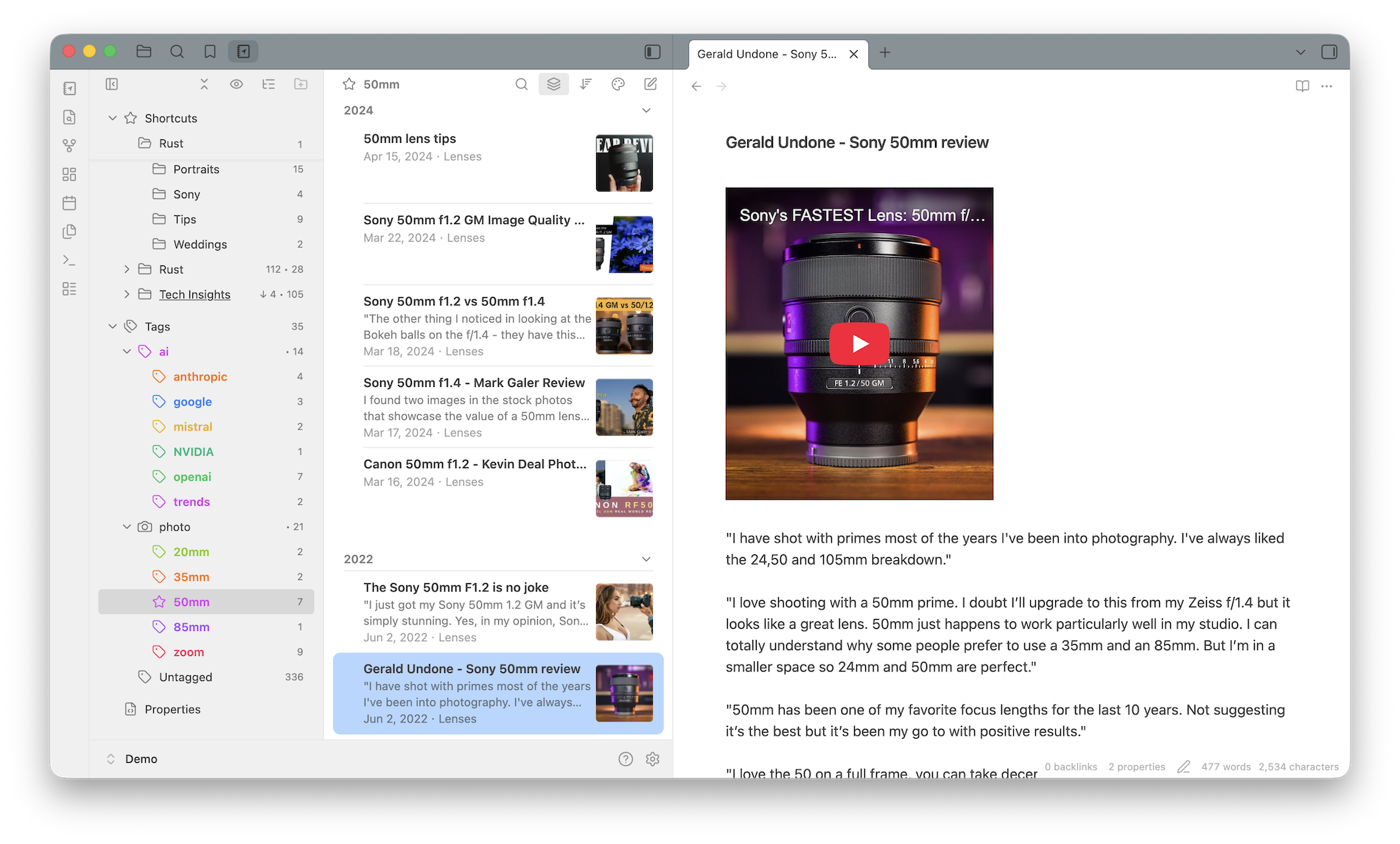
And because it is a file browser, not a database, Notebook Navigator never moves, renames or reorganizes your notes. Everything stays standard Markdown. If you uninstall it, your vault is exactly as you left it.
Frequently asked questions
Can I import my Evernote notebooks and tags into Obsidian?
Yes. Export each notebook from Evernote as an .enex file, then use the official Obsidian Importer plugin. Notes are converted to Markdown, attachments are copied into your vault, and tags are preserved.
Is Obsidian with Notebook Navigator a free Evernote alternative?
Yes. Obsidian is free for personal use and Notebook Navigator is free and open source under GPL-3.0. There are no note limits or device limits, and your notes are stored locally as Markdown files.
Can Obsidian replace the Evernote Web Clipper?
Yes. The official Obsidian Web Clipper browser extension saves web pages as Markdown notes in your vault, and clipped pages show up with previews and thumbnails in Notebook Navigator.
Will Obsidian look as polished as Evernote?
Out of the box Obsidian ships with a plain file tree, but Notebook Navigator replaces it with an Evernote-style dual-pane layout: a notebook list on the left and a note list with previews and image thumbnails on the right.
Does Obsidian work offline and on mobile like Evernote?
Obsidian is offline-first: notes are plain files on your device, so nothing depends on a server. Obsidian and Notebook Navigator run on Windows, macOS, Linux, iOS and Android, and you can sync via iCloud, Obsidian Sync or any file sync service.
Ready to own your notes again?
Notebook Navigator is free, open source, and takes a minute to install.